What to Expect From the Website Development Process
Building a website is an important step for any business that wants to establish a strong online presence, attract customers and grow. However, if you have never worked with a website developer before, you may wonder what happens after you request a quotation, how long the project takes, what information you need to provide and what to expect before your website goes live.
Understanding the website development process helps you plan your budget, prepare the necessary content and work more effectively with your development team. It also reduces misunderstandings, prevents unnecessary delays and ensures that the final website meets your business goals.
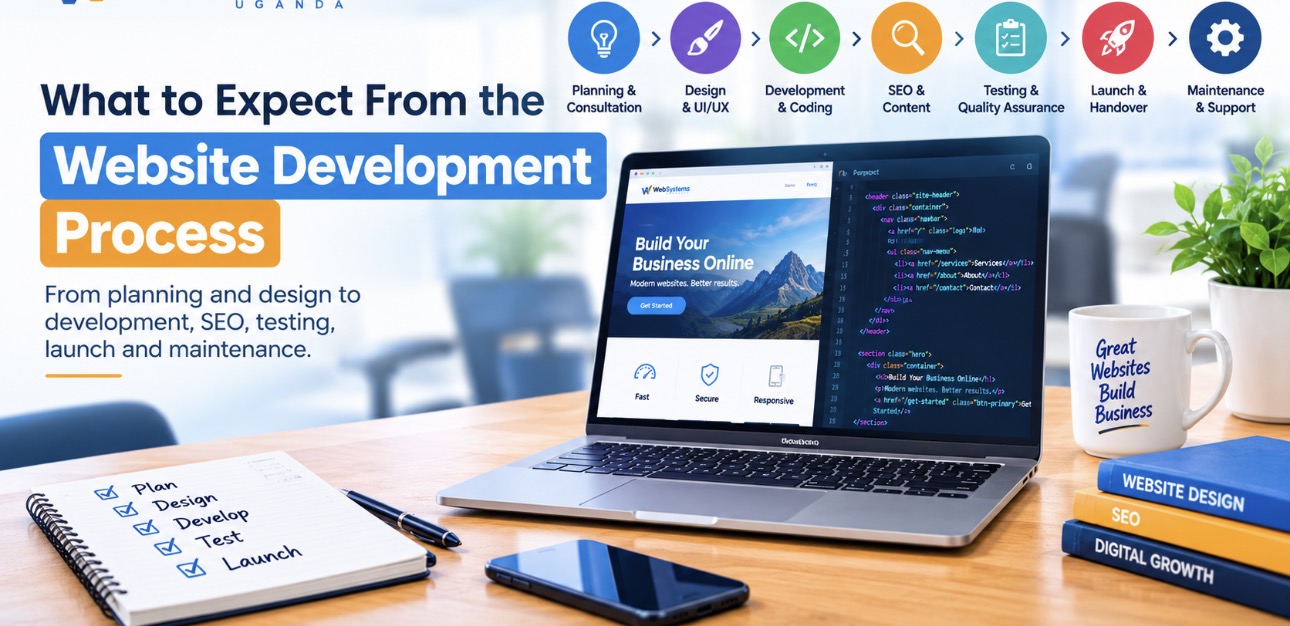
Whether you need a company website, an online store, a professional portfolio or a custom web application, the development process generally follows several important stages. These include consultation, planning, design, development, content creation, search engine optimization, testing and launch.
In this guide, WebSystems Uganda explains what to expect from the website development process, how long each stage may take, what you need to prepare and how to ensure that your new website delivers value to your business.
1. Initial Consultation and Understanding Your Business
The first stage of the website development process is understanding your business and what you want the website to achieve.
Before a developer starts designing pages or writing code, they should learn about your company, your target audience, your services and the problems your website needs to solve.
For example, a company that wants to generate customer enquiries may need a different website from an online shop that processes orders and payments.
During the initial consultation, you should expect to discuss:
- Your business name and industry.
- The purpose of the website.
- Your target customers.
- The products or services you offer.
- Your competitors and preferred website examples.
- The features you need.
- Your preferred design style and brand colours.
- Your available budget.
- Your preferred launch date.
You should also discuss how customers will use the website. Will they contact you through WhatsApp, complete an enquiry form, book an appointment, purchase products or download documents?
These details help the developer recommend the right solution.
At WebSystems Uganda, the goal should be to understand your requirements before recommending a suitable website structure, platform and development approach.
2. Planning the Website Structure and Features
After understanding your business, the next step is planning the website.
Website planning involves deciding which pages you need, what information each page should contain and how visitors will navigate between them.
A typical business website may include:
- Home page.
- About Us page.
- Services or Products page.
- Contact Us page.
- Blog or News section.
- Frequently Asked Questions page.
- Privacy Policy and other relevant legal pages.
An online store may also require product categories, individual product pages, shopping cart, checkout, payment integration and customer account functionality.
A more complex project may require user registration, dashboards, booking systems, databases, automated workflows or integrations with other business software.
Why website planning matters
Without proper planning, a website can end up with missing information, confusing navigation or features that do not support the business.
A clear plan helps establish the project scope before development begins. It also allows you to identify important requirements early, when changes are generally easier to accommodate.
You should expect the developer to explain the proposed page structure, essential features and any limitations that may affect the project.
3. Choosing the Right Website Platform
Once the requirements are clear, the developer can recommend the most appropriate technology for your website.
Two common options are WordPress and custom website development.
WordPress website development
WordPress is a content management system that allows you to manage pages, publish blog posts, update images and maintain website content through an administration dashboard.
It is suitable for many business websites, company profiles, blogs, portfolios and online stores.
WordPress can also be extended with custom themes, plugins and integrations to support more advanced requirements.
Custom website development
Custom development involves building website functionality specifically around your business requirements.
It may be suitable for specialized booking systems, business management applications, customer portals, complex dashboards and platforms with unique workflows.
The best option depends on your required features, budget, maintenance plans and future growth.
Choosing the right platform early helps prevent unnecessary costs and makes it easier to maintain the website after launch.
If you are unsure which option is suitable, read our guide to WordPress vs custom website development.
4. Website Design and User Experience
After the structure and platform have been agreed upon, the design stage begins.
Website design is not just about choosing colours and making pages look attractive. It is also about making the website easy to understand, navigate and use.
The design should reflect your brand and help visitors find the information they need.
During this stage, you may review:
- The website layout.
- Brand colours and typography.
- Navigation menus.
- Page sections and content arrangement.
- Buttons and calls to action.
- Contact forms.
- Mobile and tablet layouts.
- Images, illustrations and other visual elements.
For example, a business that depends on customer enquiries should make its phone number, contact form or WhatsApp option easy to find.
An online store should make product discovery, pricing, delivery information and checkout straightforward.
What should you expect from the design stage?
Depending on the project, the developer may provide sample layouts, wireframes or visual mock ups for your review.
You should have an opportunity to provide feedback within the agreed revision process.
It is important to agree on the design direction before extensive development begins. Major design changes later in the project may affect the timeline and cost.
A professional website should also provide a consistent experience across desktop computers, tablets and mobile phones.
5. Website Content Preparation
Website content includes the words, images, videos and other information visitors see on your pages.
Good content explains what your business does, why customers should choose you and how they can take the next step.
Depending on your agreement, you may be responsible for providing the content, or your developer may offer content writing and preparation services.
Typical content requirements include:
- Business introduction.
- Company background.
- Descriptions of services or products.
- Contact details.
- Business location and opening hours, where applicable.
- Team information.
- Product photographs or service images.
- Customer testimonials, where genuine and authorized.
- Frequently asked questions.
- Privacy and other relevant policy information.
Why content should be prepared early
Delaying content can delay the entire website development process.
Designers need to understand the amount and type of content each page will contain. Developers also need to know whether a page requires a form, product listing, downloadable document or another feature.
Prepare accurate information and provide images you have permission to use.
If you do not have professional photographs, discuss suitable alternatives with your developer.
Content should be clear, accurate and written for your target customers rather than filled with repeated keywords.
6. Website Development and Coding
Once the design direction and content requirements are clear, the developer begins building the website.
This is the stage where the approved design and planned features become a working website.
Depending on the project, development may involve WordPress configuration, theme customization, HTML, CSS, JavaScript, PHP, database development, API integrations or other technologies.
The work may include:
- Building website pages and layouts.
- Implementing responsive design.
- Configuring menus and navigation.
- Adding contact forms.
- Integrating WhatsApp links.
- Setting up product listings and checkout.
- Connecting payment gateways where required.
- Implementing user accounts and permissions.
- Configuring the content management system.
- Setting up analytics and essential integrations.
The exact work depends on the agreed project scope.
Should you expect regular updates?
Yes. You should agree on how progress will be communicated and when you will be able to review the developing website.
The developer may share a staging website, which is a private or pre-launch version where you can inspect the pages and test the features before the website becomes publicly available.
A staging environment helps identify problems early and reduces the risk of launching an unfinished website.
7. Search Engine Optimization During Development
Search engine optimization, commonly known as SEO, should be considered throughout the website development process rather than added as an afterthought.
SEO helps search engines understand your pages and can improve your chances of appearing for relevant searches. However, no developer can guarantee a specific Google ranking simply by building a website.
Technical SEO and on-page optimization should be planned alongside the design and development work.
Essential website SEO tasks
SEO-friendly URLs: Use clear and descriptive URLs that reflect the page topic.
Page titles: Give important pages unique, descriptive title tags.
Meta descriptions: Write useful descriptions that accurately summarize each page.
Heading structure: Organize information using logical H1, H2 and H3 headings.
Image optimization: Compress images and use meaningful alternative text for informative images.
Internal linking: Link related pages and blog posts to help visitors discover relevant information.
Mobile usability: Make sure the website works properly on phones and tablets.
Technical accessibility: Ensure important pages can be crawled and indexed by search engines.
HTTPS: Secure the website using a valid SSL/TLS certificate.
XML sitemap: Make the website’s important URLs discoverer through a sitemap.
Analytics and monitoring: Set up appropriate measurement tools and Google Search Console where applicable.
Why internal linking matters
Internal links connect related pages on your website.
For example, a blog post about choosing a website platform can link to your WordPress development services. An article about online stores can link to your e-commerce development service.
These links help visitors move between relevant pages and help search engines discover the relationship between your content.
For more information, read our guide on why your website may not be showing up on Google and how to fix it.
Remember that SEO is an ongoing activity. Publishing a website creates the foundation, but useful content, technical maintenance and continued improvement are important for long-term performance.
8. Mobile Responsiveness and Website Performance
Many people access websites using mobile phones. Your website should therefore provide a good experience on smaller screens as well as on desktop computers.
Responsive design allows the page layout to adapt to different screen sizes.
During testing, check that:
- Text is readable without unnecessary zooming.
- Menus work correctly on mobile devices.
- Buttons are easy to tap.
- Forms are easy to complete.
- Images fit their containers.
- Content does not overflow horizontally.
- Important contact information remains accessible.
Performance is equally important.
Large images, excessive JavaScript, unnecessary plugins, poor hosting and inefficient code can make a website slow.
Developers should optimize appropriate images, configure caching where suitable, reduce unnecessary resources and test important pages.
Google PageSpeed Insights can help identify performance issues. Core Web Vitals can also provide useful information about loading performance, responsiveness and visual stability.
A fast website can improve usability, but speed alone does not guarantee high search rankings or more sales.
9. Website Testing and Quality Assurance
Before your website launches, it should be tested to confirm that its pages and features work as expected.
Testing helps identify broken links, layout problems, form errors, compatibility issues and other defects that could affect visitors.
A website testing checklist should include:
- Checking every important page.
- Testing navigation menus and internal links.
- Submitting contact forms.
- Confirming emails and notifications are delivered where configured.
- Testing WhatsApp and telephone links.
- Testing product purchases and checkout if applicable.
- Checking mobile and desktop layouts.
- Reviewing spelling and content accuracy.
- Checking images and downloadable files.
- Confirming HTTPS works correctly.
- Testing redirects and important URLs.
- Checking basic SEO settings and indexability.
- Reviewing performance and accessibility.
- Testing backup and recovery arrangements where appropriate.
For e-commerce websites, test the entire purchase process, including order confirmation and payment status handling.
For websites with user accounts, test permissions and access controls to ensure users cannot access information they are not authorized to see.
You should also have an opportunity to review the website and report issues before final approval.
10. Domain Name, Hosting and SSL Setup
Before a website can be accessed publicly, it needs a domain name and a hosting environment or another suitable deployment platform.
A domain name is the address people type into their browsers to visit your website.
Hosting provides the infrastructure that stores or runs the website and makes it accessible online.
An SSL/TLS certificate enables HTTPS, helping protect information exchanged between visitors and the website.
During this stage, the developer may help you:
- Register or connect your domain.
- Configure DNS records.
- Set up web hosting.
- Install or configure SSL/TLS.
- Create professional email accounts if included.
- Configure backups.
- Prepare the production environment.
- Deploy the website files and database where applicable.
Who should own the domain?
Your business should retain control of its domain registration and essential accounts.
If a developer registers the domain on your behalf, make sure you know where it is registered, who controls the account and how ownership can be transferred if necessary.
Clarify renewal costs, hosting fees, email limits and any recurring subscriptions before approving the project.
These details help you avoid unexpected expenses after launch.
11. Website Launch and Going Live
Once the website has passed testing and you have approved the final version, it can be launched.
Launching means making the website available to the public on its intended domain.
Depending on the project, the developer may need to configure DNS, deploy the production website, migrate content, apply redirects and verify that all essential services are working.
After deployment, the developer should check that:
- The domain opens correctly.
- HTTPS works properly.
- Important pages load.
- Forms and contact links work.
- Images and other assets display correctly.
- The website is accessible on mobile devices.
- Important redirects are functioning.
- Search engines are not accidentally blocked from indexing the public site.
- Analytics and monitoring tools are configured where required.
If an existing website is being replaced, additional care is needed to preserve important URLs, redirect changed pages appropriately and avoid unnecessary loss of search visibility.
Launching the website is an important milestone, but it does not mean that every future task is complete.
12. Website Handover and Training
After launch, you should understand how to use and manage the website.
A proper handover may include access to the administration dashboard, hosting account, domain registrar and other relevant services.
Depending on your agreement, the developer may also provide training on how to:
- Edit website text.
- Upload and replace images.
- Publish blog posts.
- Add or update products.
- Review contact form submissions.
- Manage website users.
- Perform basic maintenance.
- Request technical support.
You should receive the access details and documentation needed to operate the website.
Clarify which features you can manage yourself and which changes require a developer.
A website should not become difficult to maintain simply because the original developer is unavailable.
13. Website Maintenance After Launch
A website requires ongoing care to remain secure, functional and useful.
Maintenance requirements vary depending on the platform, hosting environment and complexity of the website.
WordPress websites may need core, theme and plugin updates. Custom applications may require framework updates, dependency maintenance, code changes and additional testing.
Typical website maintenance tasks include:
- Updating software and dependencies.
- Monitoring security and uptime.
- Maintaining regular backups.
- Testing forms and important features.
- Fixing broken links and technical issues.
- Monitoring website performance.
- Reviewing analytics and search performance.
- Updating outdated content.
- Renewing domains, hosting and subscriptions.
- Testing backup restoration periodically.
Ask your developer whether maintenance is included in the original quotation or offered as a separate service.
It is also important to know who will respond if the website goes offline or experiences a security problem.
A clear maintenance arrangement helps protect your investment and reduces the risk of unexpected downtime.
14. How Long Does the Website Development Process Take?
The time required to build a website depends on its size, functionality, content readiness and approval process.
A simple website with a few pages usually takes less time than an online store or a custom business application.
The following are illustrative planning estimates rather than guaranteed delivery times.
Typical website development timelines
Simple business website: approximately 1–3 weeks
A small website with a few pages, standard contact forms and straightforward functionality may fit within this range when content and feedback are provided promptly.
Standard business website: approximately 2–5 weeks
A larger company website with several service pages, a blog, custom styling and basic integrations may require more planning, development and testing.
E-commerce website: approximately 4–8 weeks or more
Online stores require product setup, checkout configuration, payment testing, delivery rules and order management.
Custom web application: several weeks to several months or more
Applications with user accounts, complex workflows, databases, external integrations or specialized dashboards require detailed planning and development.
These ranges can overlap because project complexity varies. The actual schedule should be agreed upon after requirements are assessed.
What can delay a website project?
Common causes of delays include:
- Late submission of content and images.
- Slow approval of designs.
- Frequent changes to the agreed scope.
- Missing product or business information.
- Third-party integration problems.
- Domain or hosting configuration issues.
- Additional features requested during development.
- Delays in payment or access to required accounts.
You can help keep the project on schedule by preparing your content, agreeing on the requirements and providing feedback within the agreed time.
15. What Determines the Cost of Website Development?
Website development prices vary because websites differ in scope, design requirements and functionality.
A simple company website does not require the same amount of work as a custom booking platform or an online store with extensive integrations.
Important cost factors include:
Number of pages: More pages may require additional design, content preparation and development.
Design complexity: Bespoke layouts and advanced interactive features may increase the workload.
Functionality: Booking systems, payment integrations, user dashboards and automation require additional implementation and testing.
Content creation: Copywriting, photography, video production and product entry may affect the total cost.
SEO requirements: Technical setup and on-page optimization may be included or priced separately.
Domain and hosting: Registration, hosting resources, email services and renewals contribute to ongoing costs.
Maintenance: Updates, support, security monitoring and future improvements may require a separate arrangement.
Before approving a quotation, request a clear breakdown of what is included and excluded.
Confirm whether the price covers the domain, hosting, SSL/TLS, email accounts, content writing, revisions, training and post-launch support.
If you want to understand your options, visit WebSystems Uganda to explore website development services for your business.
16. What Do You Need to Provide as a Client?
Website development works best when the business owner and developer cooperate throughout the project.
You do not need to know how to code, but you should be prepared to provide the information and decisions required to build the website correctly.
Before development begins, try to prepare:
- Your business name and logo.
- A description of your business and services.
- Your preferred contact information.
- Your target audience.
- Examples of websites you like.
- Your brand colours, if established.
- Page content and images, if available.
- Product information for online stores.
- Domain and hosting details, if already owned.
- Details of required integrations.
- A realistic budget and target launch date.
You should also nominate a person who can review designs, answer questions and approve important decisions.
Providing complete and accurate information early can reduce unnecessary revisions and help the developer deliver a website that matches your expectations.
17. Common Mistakes to Avoid During Website Development
Choosing a developer based only on price
A low quotation may seem attractive, but it is important to understand the scope, quality standards and support included.
Compare proposals based on deliverables, relevant experience, technical quality and long-term value rather than price alone.
Changing requirements repeatedly
New ideas may arise during development, but frequent changes can affect the schedule and budget.
Agree on the initial scope and use a clear change-request process for additional features.
Ignoring mobile users
A website that looks good on a desktop but is difficult to use on a phone can frustrate visitors and reduce enquiries.
Mobile testing should be part of the development process.
Treating SEO as an afterthought
Planning SEO during development helps avoid preventable problems with URLs, page structure, indexing and content organization.
Forgetting about maintenance
A website needs updates, backups and monitoring. Plan for these responsibilities before launch.
Failing to secure website ownership
Make sure your business has the appropriate access to its domain, hosting, website administration, content and other essential accounts.
Expecting instant Google rankings
A new website may take time to be discovered, crawled and indexed. Competitive search terms may require ongoing content development, technical improvements and legitimate promotion.
No developer can guarantee a particular ranking or a specific number of customers simply by launching a website.
18. How to Choose the Right Website Development Company
Choosing the right developer or agency is an important part of a successful website project.
Look for a provider who understands your business goals, explains technical decisions clearly and can demonstrate relevant work.
Before signing an agreement, ask:
- Have you developed websites similar to mine?
- What is included in the quotation?
- How long will the project take?
- Who provides the content?
- Is SEO included?
- Will the website work on mobile devices?
- Who owns the domain and website files?
- What happens if I need additional features?
- Is training included?
- What maintenance and support are available after launch?
A reliable development partner should be transparent about timelines, costs, responsibilities and limitations.
At WebSystems Uganda, the aim is to help businesses choose practical website solutions that support their goals, provide a professional online presence and remain manageable over time.
Frequently Asked Questions About the Website Development Process
What are the main steps in website development?
The main steps are consultation, planning, platform selection, design, content preparation, development, SEO implementation, testing, domain and hosting setup, launch, handover and ongoing maintenance.
The exact sequence can vary depending on the project.
How long does it take to develop a website?
A simple business website may take around one to three weeks, while a larger business website may take several weeks. E-commerce websites and custom applications may require longer, depending on their features and complexity.
The developer should provide a project-specific estimate.
What do I need before starting a website project?
You should have a clear business objective, an understanding of your target audience, a list of required pages and features, contact information, available branding and a budget.
You can prepare content and images before development begins, although the developer may also offer these services.
Is SEO included in website development?
It depends on the agreement. Basic technical and on-page SEO can be included in the development process, but ongoing SEO campaigns, extensive content creation and link-building activities may be separate services.
Always confirm what SEO deliverables are included in your quotation.
Will I be able to update my website myself?
Yes, if the website includes a suitable content management system or administration dashboard. WordPress makes it possible to update many pages, images and blog posts without editing code.
Custom websites can also provide administration dashboards, but the functionality must be developed or integrated.
What happens after my website launches?
After launch, you should monitor the website, maintain backups, apply necessary updates, test important features and keep content current.
You may also continue improving SEO, adding content and reviewing analytics to understand how visitors use the website.
Do I need to buy a domain name and hosting?
Most websites need a domain and an appropriate hosting or deployment service. These may be included in your developer’s quotation or purchased separately.
Confirm who owns the domain, how renewals work and what ongoing costs you should expect.
Can I change my website after it has been launched?
Yes. Websites can be updated with new pages, images, services, features and integrations. The cost and complexity depend on the change and the website’s architecture.
Will my website automatically appear on Google?
No. Launching a website does not guarantee immediate indexing or high rankings. Search engines need to discover and crawl the pages, and the website must meet their technical requirements.
Google Search Console can help you monitor indexing and identify certain search-related issues.
What is the difference between website design and website development?
Website design focuses on the visual appearance, layout and user experience. Website development implements the design and makes the website’s features work.
Many projects combine both services, alongside content preparation, SEO and testing.
Conclusion: Prepare for a Successful Website Development Project
The website development process involves more than creating attractive pages. It requires planning, clear communication, suitable technology, quality content, responsive design, SEO, testing and ongoing maintenance.
When you understand each stage, you can prepare the right information, make informed decisions and work more effectively with your developer.
Start by defining what your business needs the website to achieve. Then agree on the pages, functionality, budget, timeline and responsibilities before development begins.
A well-planned website can help your business establish credibility, communicate its value, reach potential customers and support future growth.
Ready to build a professional website for your business?
WebSystems Uganda provides website design and development services, WordPress solutions, e-commerce development and SEO support for businesses in Kampala and across Uganda.
Visit WebSystems Uganda to explore our services, or contact our team to discuss your website project and get started.